


Agentic AI
What 'Agentic AI' Actually Means for Your SaaS Product
You've heard it everywhere. Agentic AI. Agentic workflows. Agentic everything.
And if you're a SaaS founder, you've probably rolled your eyes at least once. Because half the time, when someone says "Agentic AI," they just mean a chatbot with a slightly longer memory. Or worse, they mean a regular automation tool with a new badge on it.
What Does "Agentic" Even Mean?
Here's the simplest way to think about it.
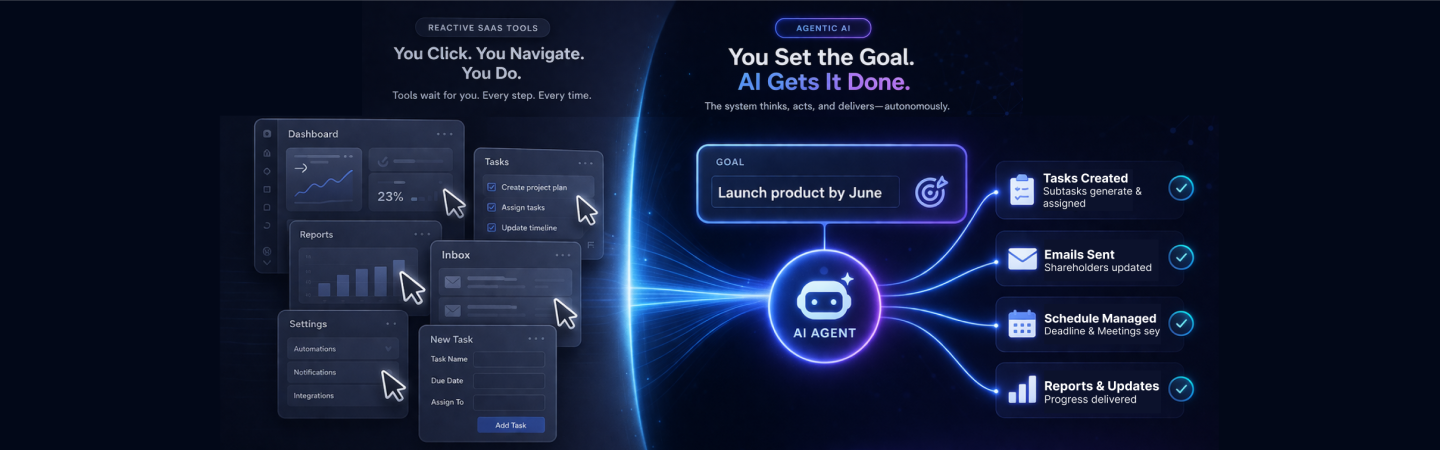
Most AI tools today are reactive. You type something, they respond. You click a button, something happens. The tool waits for you. Always.
An agentic AI system doesn't wait.
It receives a goal, not just a command and then figures out the steps to get there on its own. It can make decisions, use tools, check its own work, and loop back if something doesn't look right. All without you holding its hand through every step.
Think of it this way: a calculator is reactive. You punch in numbers, it gives you a result. A CFO is agentic. You tell them "we need to cut costs by 15% before Q3" and they go away, come back with a plan, execute parts of it, and report back.
Why Most "AI Features" in SaaS Aren't Actually Agentic
Here's something worth pausing on: adding a ChatGPT box to your dashboard is not agentic AI. It's a chat window. It's useful, sure. But it doesn't change how your product fundamentally operates.
A lot of founders are shipping AI features that are really just generative tools bolted onto an existing workflow. Your users still do the same 12 steps they always did, they just have an AI helping them write the copy in step seven.
Real agentic AI for SaaS products collapses those 12 steps. It takes the goal your user has in mind and handles the steps between A and Z by itself, checking in where it needs to, handing off where it should, and completing the loop.
That's not a feature. That's a different product.
What Does Agentic UX Design for SaaS Actually Look Like?
This is where it gets practical. Let's walk through a few real examples of what agentic AI design for SaaS looks like across different product categories. See if any of these sound like your product.
Project Management SaaS: A user sets a deadline for a product launch. The agentic layer automatically creates subtasks, assigns them based on past behaviour, flags blockers before they happen, and sends updates to stakeholders, without the user having to open a single menu. The user just sees it happen.
HR and Recruiting SaaS: A hiring manager says "I need a senior backend engineer by August." The agent searches the ATS, finds warm candidates, drafts outreach, schedules interviews, and updates the pipeline, checking back only when a human decision is needed.
Finance or Accounting SaaS: A founder uploads a client contract. The agent reads it, creates the invoice, adds it to the billing schedule, and flags anything unusual. No one had to tell it how to do any of that.
Customer Success SaaS: An account shows signs of churn, usage dropped, support tickets went unanswered. The agentic system notices, drafts a check-in email, alerts the CSM, and prepares a health score summary, all before anyone manually checked the dashboard.
Do you see what's happening? In each of these, your user isn't navigating your product anymore. They're directing it. The product does the work.
That shift, from navigation to direction, is the heart of agentic UX design for SaaS.
How Do You Actually Add AI Agents to SaaS?
This is the question most founders get stuck on. "Okay, I get it. But how do I actually add AI agents to SaaS without rebuilding everything from scratch?"
The good news is you don't need to. You start with one workflow.
Pick the most repetitive, rule-heavy workflow your users go through in your product. The one where you know every step. The one your users complain about, or the one your power users have already figured out shortcuts for.
That's your first agentic workflow. You're not replacing your product, you're giving it one job it can handle from end to end without interruption.
From there, you layer. You add memory (so the agent knows context from past sessions). You add tool use (so the agent can interact with other systems). You add judgment calls (so the agent knows when to ask a human and when to keep going).
Step by step, your product stops being a tool users operate and starts being a system that operates on their behalf.
What About Trust? Won't Users Be Scared of Automation They Can't See?
Yes, and that's a real design challenge. It's also one of the most important parts of building autonomous AI agents for SaaS the right way.
Nobody wants their software doing things they don't understand. That's a recipe for churn, not retention.
The answer isn't to slow down the automation. The answer is visibility with control. Think of it like a car with autopilot. The driver can see what the car is doing, override it at any time, and understands where it's headed. They don't feel out of control, they feel freed up.
Good agentic UX always shows the user:
- What the agent is doing right now
- Why it made a particular decision
- Where they can step in and change course
When users can see the agent working for them transparently, trust builds fast. And once it builds, retention goes through the roof, because your product isn't just useful anymore. It's indispensable.
The Real Competitive Advantage Here
Here's what all of this adds up to for you as a founder.
Right now, most SaaS products are competing on features. Who has the better dashboard? Who has more integrations? Who's cheaper? That game is exhausting and the margins are shrinking.
When you build agentic AI for SaaS products, you stop competing on features and start competing on outcomes. Your users don't care how many buttons your product has. They care about what gets done.
A product that consistently delivers outcomes, without the user having to remember every step, is a product that becomes part of someone's daily rhythm. That's where stickiness comes from. That's where word-of-mouth comes from. That's where your moat lives.
The founders who figure this out first, in their category, will be very hard to displace.
So, What's Your Next Move?
If you're reading this and thinking "I can see exactly where this fits in my product", that's the signal. Start there. One workflow. One agent. One outcome delivered without friction.
If you're still not sure how to connect agentic AI to your specific product, or where to start building, that's what our SaaS playbook is for.
It's not a feature. It's a new way your product works.
Download Our SaaS Playbook, and get a step-by-step framework for adding your first agentic workflow, with real examples from SaaS products across categories.





FAQs
Is agentic AI only for enterprise SaaS?
Do I need to build my own AI models?
Will this make my product harder to use?
What's the difference between agentic AI and automation?
How long does it take to ship an agentic feature?